3mpStudio Logo

3mpStudio ALT Finder Pro

Find Missing ALT Text. Fix It Faster.

A simple WordPress plugin for finding images with missing ALT text and updating your Media Library without opening every image one by one.
Find missing ALT text. Edit in bulk. Save everything at once.

Built for WordPress • One-time purchase • Developed by 3mpStudio

WORDPRESS MEDIA TOOL

ALT Finder Pro

Find the gaps. Write with context. Update in batches.
A BETTER WORKFLOW

Managing Image ALT Text Shouldn’t Take All Day

WordPress makes adding ALT text easy when uploading. Finding previously uploaded images with missing ALT text is another story.
When your Media Library contains hundreds—or thousands—of images, opening each attachment individually becomes a tedious job.
3mpStudio ALT Finder Pro puts your ALT text workflow on one screen.
Find images that need attention, enter better ALT text, and save multiple changes together.
PRODUCT TOUR

See ALT Finder Pro in Action

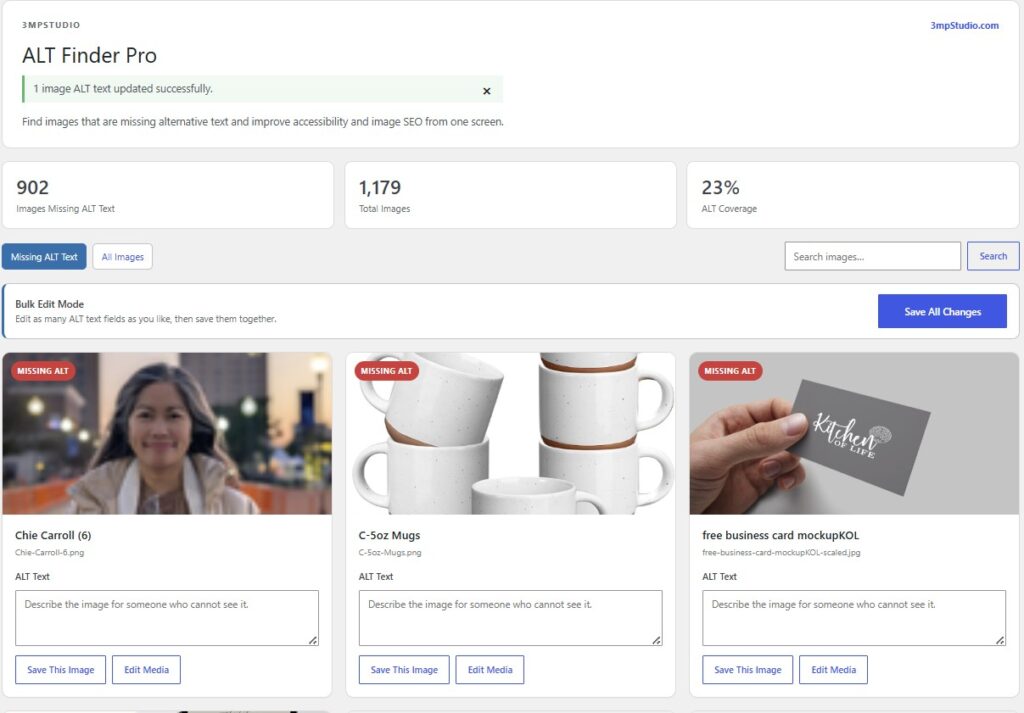
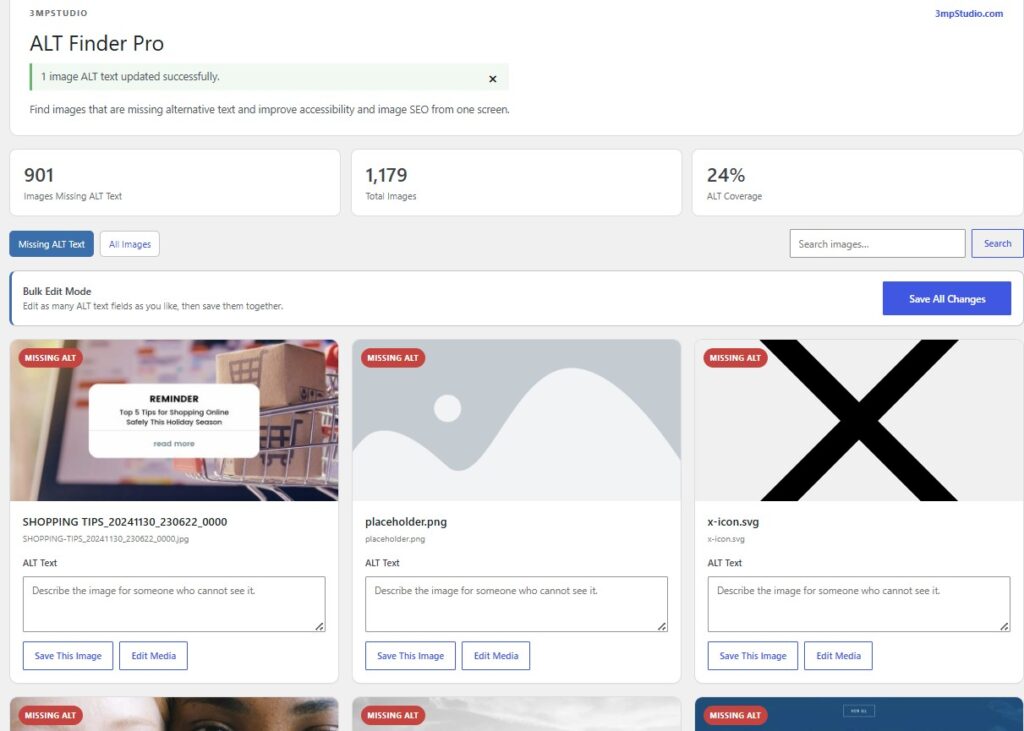
Find Images Missing ALT Text

Quickly see which images in your WordPress Media Library don’t currently have ALT text.
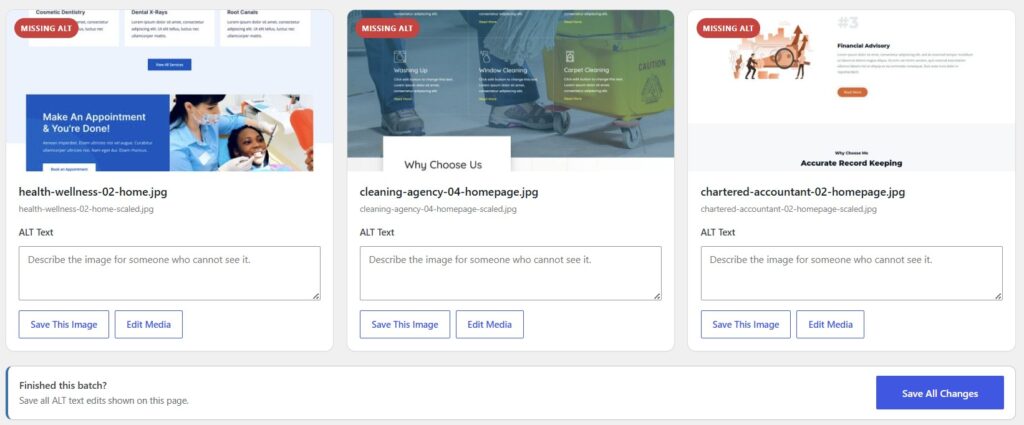
Batch edit WordPress media

Edit ALT Text From One Screen

See the image, filename, and ALT text field together while writing descriptions.
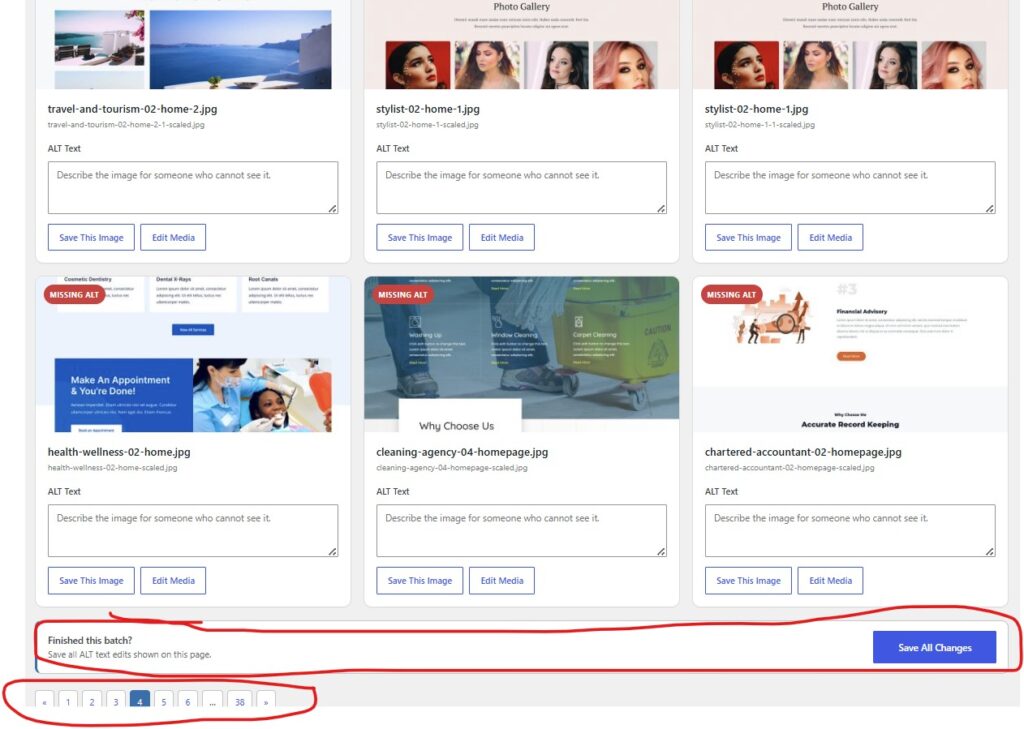
Bulk edit media files ALT text

Update Multiple Images at Once

Work through an entire batch without saving after every field.

Save All Your Changes

Click Save All Changes and securely update your edited images.
BUILT FOR REAL MEDIA LIBRARIES

What You Can Do With ALT Finder Pro

A focused workflow for finding, reviewing, and updating image ALT text.

Find Missing ALT Text

Scan the Media Library and identify images without ALT text.

Bulk Edit ALT Text

Update multiple image descriptions from the same screen.

Save All Changes

Update an entire page with one save action.

Search Your Media Library

Find a particular image directly from ALT Finder.

Review ALT Coverage

See how many images have ALT text and how many need attention.

View All Images

Switch between missing results and your complete library.

Edit Individual Images

Individual image saving remains available.

COMPARE VERSIONS

Choose the ALT Finder That Fits Your Workflow

Start free for individual updates or choose Pro for batch editing.

ALT Finder Free

For smaller websites and individual updates.

ALT Finder Pro

For larger Media Libraries and faster batch work.

SIMPLE PRICING

No Subscription.

One payment for one WordPress website.

3mpStudio ALT Finder Pro

$39
One Website • One-time purchase

No subscription. No activation key.

Requires a self-hosted WordPress website that allows plugin installation.
FIVE SIMPLE STEPS

How ALT Finder Pro Works

From installation to finished ALT text in one straightforward workflow.

1. Install

Download the plugin ZIP after purchasing.

2. Activate

Upload and activate it in WordPress.

3. Find

Go to Media → ALT Finder.

4. Edit

Enter meaningful ALT text beneath each image.

5. Save

Click Save All Changes.
INSTALLATION

Installing ALT Finder Pro

Download the plugin ZIP after purchasing. Do not unzip the file.

New Installation

Plugins → Add New Plugin → Upload Plugin

Select the ZIP, click Install Now, then Activate Plugin.

Media → ALT Finder

Upgrading From Free?

Deactivate 3mpStudio ALT Finder Free before installing Pro. Existing ALT text remains intact because ALT Finder uses standard WordPress image ALT metadata.
DEFENSIVE DEVELOPMENT

Built With WordPress Security in Mind

ALT Finder Pro works with WordPress’s native security and permissions system.
No plugin can guarantee the security of an entire WordPress website. WordPress core, hosting, themes, other plugins, passwords, server configuration, and updates all contribute to security. ALT Finder Pro follows defensive development practices within the functionality it controls.
QUESTIONS ANSWERED

Frequently Asked Questions

Each question and answer is a separate native Elementor widget.

Does ALT Finder Pro automatically write ALT text for me?

Not currently. It helps you find, review, write, and manage ALT text while keeping you in control.

What’s the difference between Free and Pro?

Free supports individual edits. Pro adds bulk editing and Save All Changes.

Will upgrading delete my existing ALT text?

No. ALT Finder uses standard WordPress image attachment metadata.

What happens if I uninstall ALT Finder?

Your ALT text remains in WordPress.

Does it rename image files?

No. ALT Finder Pro updates ALT text only.

Will it improve my Google rankings?

No plugin can guarantee rankings. ALT text can support accessibility and image understanding when appropriate.

Should every image have ALT text?

No. Purely decorative images may appropriately use empty ALT attributes.

Does it work with WooCommerce product images?

It works with standard WordPress Media Library image attachments. Compatibility can depend on output implementation.

How many websites can I install ALT Finder Pro on?

ALT Finder Pro does not use activation keys or site-count restrictions. Your purchase provides access to the Pro download and included v1.x updates through your 3mpStudio account.

Do I need to keep ALT Finder installed?

No. You can deactivate it after cleanup; saved ALT text remains in WordPress.
BUILT BY 3MPSTUDIO

A Small Tool for a Repetitive WordPress Problem

ALT Finder started with a simple question: How do we quickly find Media Library images that are missing ALT text without opening them one at a time?
So we built a tool for website owners, marketers, developers, and agencies.

Developed by 3mpStudio in Waco, Texas.
WORK FASTER

Spend Less Time Opening Images One at a Time.

Find missing ALT text, work through your Media Library, and save multiple updates from one screen.

3mpStudio ALT Finder Pro

$39 • One Website • One-Time Purchase

Need help with installation or licensing? Contact 3mpStudio Support.

Scroll to Top